HTML JOS Report Style Guide
| Supported Applications: | All |
|---|
The HTML JOS Report format files are designed to generate a series of HTML tables. One table for the general
Job Information, one for the Tool report section, and another for the Step report section. Additionally, some simple
formatting changes that affect the entire report. When taken together, for Report format (.fmt)
and format include (.inc) files, use the JOS Report's formatting information to output structured HTML code.
This HTML code is then styled using Cascading Style Sheet (.css) files.
Related Information
To make the most of the report file's styling features, the person or persons making the changes should have a working knowledge of both the JOS Report's formatting commands and general HTML/CSS design.
JOS Report Formatting
Learning SmartCAM includes several helpful topics and tutorials on working with JOS Reports.
- Using SmartCAM - Customizing Format Files
- Using SmartCAM - Reports
- Creating a Custom Report Tutorial
HTML/CSS
Numerous books and websites explain how to work with HTML files and Cascading Style Sheets.
One good source is the W3Schools website.
Report Files
The main report format files are:
| Product Family | File |
|---|---|
| Milling | \ProgramData\SmartCAM\Common\Reports\mill_report_htm.fmt
|
| Turning | \ProgramData\SmartCAM\Common\Reports\turn_report_htm.fmt
|
| Fabrication | \ProgramData\SmartCAM\Common\Reports\fab_report_htm.fmt
|
| Wire EDM | \ProgramData\SmartCAM\Common\Reports\wire_report_htm.fmt
|
The format files (.fmt) contain basic initialization commands, such as
setting the page width, pagination, and text encoding. They then have several
#include statements,
which are used to include specific formatting files for the job information, tool list,
and step list, as well as a file which contains commonly used tools.
The HTML report uses two cascading style sheets:
| Used For | File |
|---|---|
| Screen Display | \ProgramData\SmartCAM\Common\Reports\Output\reports_scrn.css
|
| Printed Output | \ProgramData\SmartCAM\Common\Reports\Output\reports_prnt.css
|
When your web browser displays the report on the screen, the Screen Display style sheet is used. When you print the report from within the web browser, the Printed Output style sheet is used to override settings specifically to make the printed report look better.
The styles in both .CSS files use the same names and affect the same parts of the report.
Banner and Footer
There is a shared file (between the HTML report formats for all four application families), which establishes the report's banner heading and closing footer.
The file is: \ProgramData\SmartCAM\Common\Reports\glob_hdrftr_htm.inc
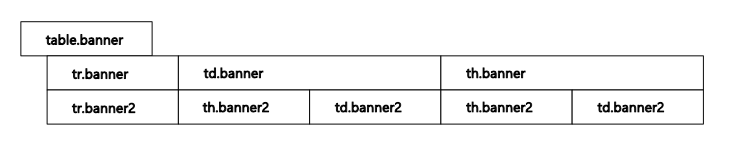
The Banner at the top of the report is a two-row table using the .banner and .banner2 classes. The following graphic illustrates the layout of the banner table in the report, along with the associated CSS classes.
The report footer, is also a table. The footer's layout and used classes are shown below.

Job Information Section
Each class of product (milling, turning, fabrication, and wire) includes a similar but slightly different include file. The include file creates and populates the Job Information section of the report.
| Used For | File |
|---|---|
| Fabrication | \ProgramData\SmartCAM\Common\Reports\fjobinf_htm.inc
|
| Milling | \ProgramData\SmartCAM\Common\Reports\mjobinf_htm.inc
|
| Turning | \ProgramData\SmartCAM\Common\Reports\tjobinf_htm.inc
|
| Wire EDM | \ProgramData\SmartCAM\Common\Reports\wjobinf_htm.inc
|
The general organization and styles used by the Job Information section of the report are shown below. The actual number of columns, rows, and content of the fields varies by manufacturing type. However, the CSS classes used are the same for all products.
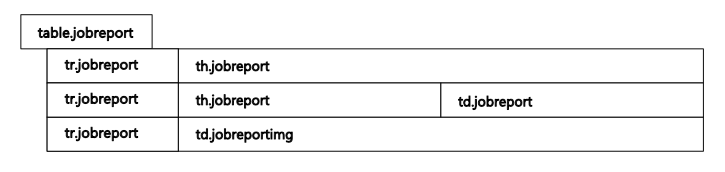
Tool List
Each class of product (milling, turning, fabrication, and wire) includes a similar but slightly different include file. The include file creates and populates the Tool List section of the report.
| Used For | File |
|---|---|
| Fabrication | \ProgramData\SmartCAM\Common\Reports\ftoolinf_htm.inc
|
| Milling | \ProgramData\SmartCAM\Common\Reports\mtoolinf_htm.inc
|
| Turning | \ProgramData\SmartCAM\Common\Reports\ttoolinf_htm.inc
|
| Wire EDM | \ProgramData\SmartCAM\Common\Reports\wtoolinf_htm.inc
|
The Tool List section of the report uses two nested tables. The top-level table styles the overall appearance of the Tool List container. It also contains table rows for each tool in the report. All classes of product use this overall layout.
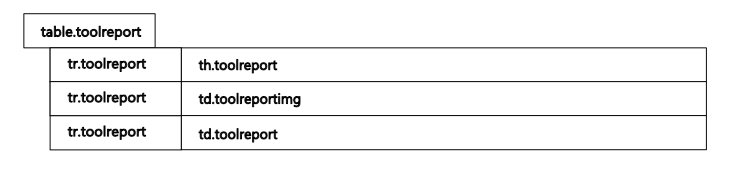
Nested within the table row for the actual tool list is another table. This table contains the formatting and information for each tool record displayed. The exact number of columns, rows, and content of the fields varies by tool type. However, the CSS classes used are the same for all products.

Step List
Each class of product (milling, turning, fabrication, and wire) includes a similar but slightly different include file. The include file creates and populates the Step List section of the report.
| Used For | File |
|---|---|
| Fabrication | \ProgramData\SmartCAM\Common\Reports\fstepinf_htm.inc
|
| Milling | \ProgramData\SmartCAM\Common\Reports\mstepinf_htm.inc
|
| Turning | \ProgramData\SmartCAM\Common\Reports\tstepinf_htm.inc
|
| Wire EDM | \ProgramData\SmartCAM\Common\Reports\wstepinf_htm.inc
|
The Step List section of the report uses two nested tables. The top-level table styles the overall appearance of the Step List container. It also contains table rows for each step in the report. All classes of product use this overall layout.
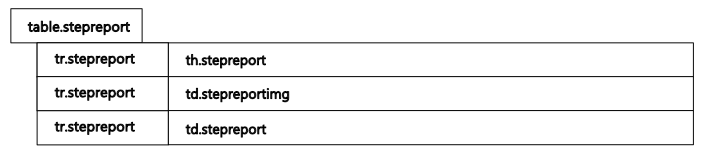
Nested within the table row for the actual step list is another table. This table contains the formatting and information for each step record displayed. The exact number of columns, rows, and content of the fields varies by step type. However, the CSS classes used are the same for all products.

General Information
CSS File Editing
Unless you specifically want the display and printed appearance of the reports to differ, remember any change you make to one of the CSS files must be duplicated in the other. Otherwise, the screen display and printed output will not match.
Table Cell Text
In the above examples of the table layouts, the names in each cell match the names used in the CSS files.